 Spintuition
 Waveforms
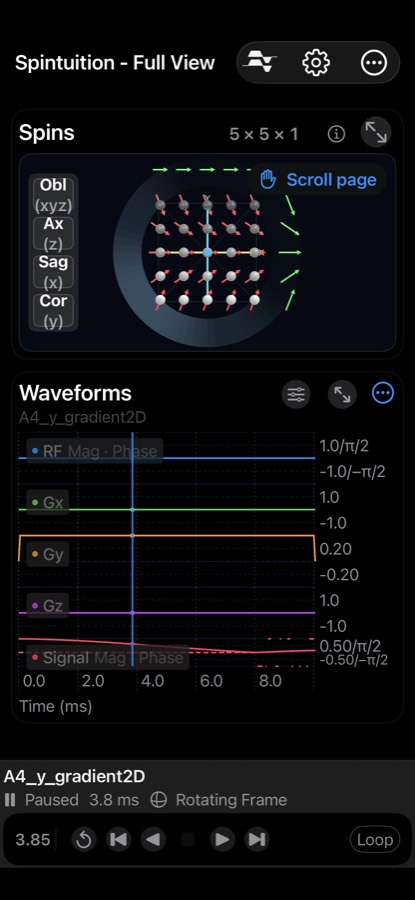
In the Full View, the Waveforms panel shows the pulse sequence over time beneath the spins, with playback controls at the bottom.
You can play a loaded sequence, scrub through it, or record your own waveforms live using the Waveform Controls sliders. Use the expand button (↗) to view the waveforms full screen.
Waveforms
| Trace | Color | Units |
|---|---|---|
| RF | Blue | Magnitude (kHz) and phase (rad) |
| Gx | Green | kHz/m |
| Gy | Orange | kHz/m |
| Gz | Purple | kHz/m |
| Signal | Pink | Complex average transverse magnetization of all spins (enable in Settings) |
Scrubbing: drag the vertical time marker to move through the sequence; the spins update to match.
Playback controls
| Control | Action |
|---|---|
| Share Waveforms | Export a Pulseq .seq file, or save to My Sequences. |
| Back to Start | Return to time 0 without erasing waveforms. |
| Play Backward / Forward | Play through the sequence in either direction. |
| Step Backward / Forward | Play a short interval (0.5 ms default step size). |
| Stop | Pause playback. |
| Restart | Clear all waveforms and reset to time 0. |
| Loop | Repeat playback continuously. |
| Speed / Step Size | Adjust playback speed and step size (expanded views). |
Sequences may also include pause points (SimmrPause), where playback stops until you
press play — used for example in the 5×5 encoding sequence.
Waveform controls
Open with the slider icon on the Waveforms panel. RF and Δf are in kHz, gradients in kHz/m and relaxation in ms.
| Control | Description |
|---|---|
| B1x | RF excitation field strength (kHz). |
| Δf | Off-resonance frequency (kHz). |
| Gx, Gy, Gz | Gradient strengths (kHz/m). |
| T1 | Longitudinal relaxation, 1–200 ms (log scale). |
| T2 | Transverse relaxation, 1–50 ms (log scale). |
| Replace Waveforms | On: playing forward or moving sliders records new waveform frames. Off: sliders affect only the live simulation, and playback uses the recorded waveforms. Turned off automatically when a sequence is loaded. |
| Lab Frame | Off: rotating frame (default). On: laboratory frame with carrier precession. |
| Show B1 | Show the RF rotation-axis vector while RF is non-zero. |
Recording your own sequence
- Turn Replace Waveforms on and press Play Forward.
- Move the B1x and gradient sliders while it plays — the timeline grows as you record (up to the maximum time in Settings).
- Press Back to Start, turn Replace Waveforms off, and play it back.
- Use Share Waveforms to save it to My Sequences or export a Pulseq file.